How it works
Pick the shape
9:16 to fill a vertical Short, 1:1 for the feed, 16:9 for YouTube and thumbnails.
Describe the shot
Subject, place, light and style: "neon-lit Tokyo alley at night, cinematic, rain".
Use it
Drag it onto the B-roll track over the moment it illustrates, or download it.
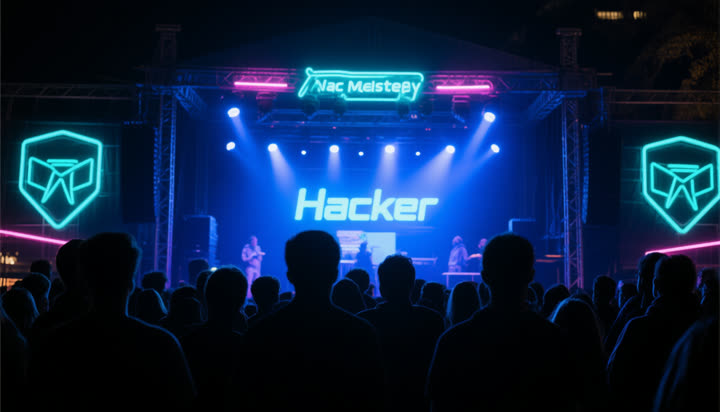
One made in Studio
Typed: "A stage at a hacker meetup at night, neon light, the crowd in silhouette", 16:9.
What you can set
| Description | Subject, setting, light, style, camera |
| Shape | 9:16 vertical, 1:1 square, 16:9 wide |
| Result | Shows in Studio, drags onto the B-roll track, downloads as a file |
How to describe a picture
- Subject first, then the place, then the light: "a speaker on stage, small club, warm spotlight".
- Add a style word or two: cinematic, documentary, illustration, flat colours.
- Pick the shape before you generate; cropping a wide picture to vertical loses most of it.
- Leave text out of the prompt. Pictures made this way often get letters wrong: put your title on top in the editor instead.
- For B-roll, cover a sentence or two (three seconds or so), then cut back to the speaker.
What it costs
Through Black Friday, November 27: every signed-in account gets 5 free AI generations a day (pictures, voiceovers, music or sound effects). Sign in with Discord, Google, GitHub or Twitch and the whole editor is free too, no card needed.
After that, Studio is part of Pro, $19 a month.
| Free account | Pro | |
|---|---|---|
| AI tools | 5 a day, through November 27 | No daily cap |
| Studio editor | Free with a social sign-in, through November 27 | Yes |
| Clips | 1 hour of video a month, small watermark | Half price, no watermark |
| Price | $0 | $19 a month |
Clips cost 10 credits per video plus 4 a minute (1 credit = 1 cent); Pro halves that. The exact price shows before anything runs.
Pro, in full
- The Studio editor and its AI tools, with no daily cap
- No watermark on any clip
- Half price on every clip: 2 credits a minute instead of 4
- Our most accurate transcription
- $19 a month, cancel any time: Pro stays on until the end of the month you paid for
Questions
Is it free?
Through November 27, every signed-in account gets 5 free AI generations a day across all of Studio's tools. After that Studio is part of Pro, $19 a month.
Do I need a video first?
No. Make it first; it waits, and lands on the timeline as soon as you import a video.
Can I use it outside Studio?
Yes. Every result has a Download button, so you can take it into any editor.
Can I make a YouTube thumbnail?
Yes: pick 16:9, describe the scene, download it and add your title in your thumbnail editor.
Can it make video?
Not yet: Studio makes pictures, and a picture held for a few seconds works as B-roll.
How long does it take?
Usually under a few minutes; the first picture can take a minute longer.